Thank you for helping with the ieeevis.org website. The easiest way for you to contribute to the website is to edit the file you want to change, directly in your browser (described below).
What will happen behind the scenes after you’re done with an edit is that GitHub will automatically create a pull request from your edit, which will let us know that you would like to update some of the content. Here is a simple guide to editing files in another user’s repository.
Table of contents
- Policies
- How to change an existing page
- Staging vs Production
- Where are the current files?
- Building the website locally
- How to compare staging and production files
Policies
Scope of responsibility for web chairs
The web chairs focus on the technical operation of the website and supporting infrastructure. Decisions about content should be handled by the appropriate content owners. Requests that involve content decisions — such as “please improve the text on page XYZ” — should directed to the person or group responsible for that content.
Similarly, when requesting that new content be added to the website, please include enough detail to allow the web chairs to implement the request efficiently. In particular, you should provide:
- the URL or section where the content should appear,
- the exact content to be added, and
- the name of the person responsible for maintaining that content going forward.
Providing this information helps ensure requests are handled smoothly and efficiently.
Web chairs will generally update the website once a week
As merge requests come in, web chairs will review them within one week, and then deploy to a staging website. Then, the core team must approve changes before they are released to the production site. This means that it will generally be about a week before a merge request submitted to web makes it to the production website.
Members of the organizing committee should keep this schedule in mind when they need updates to the website relating to their own committees. Please refrain from making urgent requests or using language such as “ASAP” or “immediately”, as the web team typically fields more than a hundred requests for changes throughout the year, on top of managing the conference content site.
Who’s responsible for what?
The point-of-contact address for each page in the website is the contact email address in each page’s front matter (which is visible on each page by looking at the footer).
If a page does not have an assigned contact, then 1) that’s likely a bug that should be reported, 2) web@ is the default point-of-contact.
This means that if you found a bug on the content of a webpage, you’re welcome to create a pull request for the content to get fixed. However, if the fix involves anything more than trivial typos, we will wait for an OK from the point-of-contact before committing the changes.
How to change an existing page
Here’s a video that illustrates the same process described in the text below:
The easiest way to suggest a change is to go on the bottom of the page you want to change and click on “file a bug”. You will be taken to the GitHub website where you can describe the problem, and web@ will get a notification when the bug is filed.
If you are an organization member, the best way to suggest a change is to go on the bottom of the page you want to change and click on “suggest a fix”. You can even go to a webpage that hasn’t been created yet (like http://ieeevis.org/year/2026/hellothere) and click on the link for making a new page. You will be taken to GitHub to make your edits.
To continue, you will be asked to log in to a GitHub account. After you do so, you will be shown an interface that looks like this:
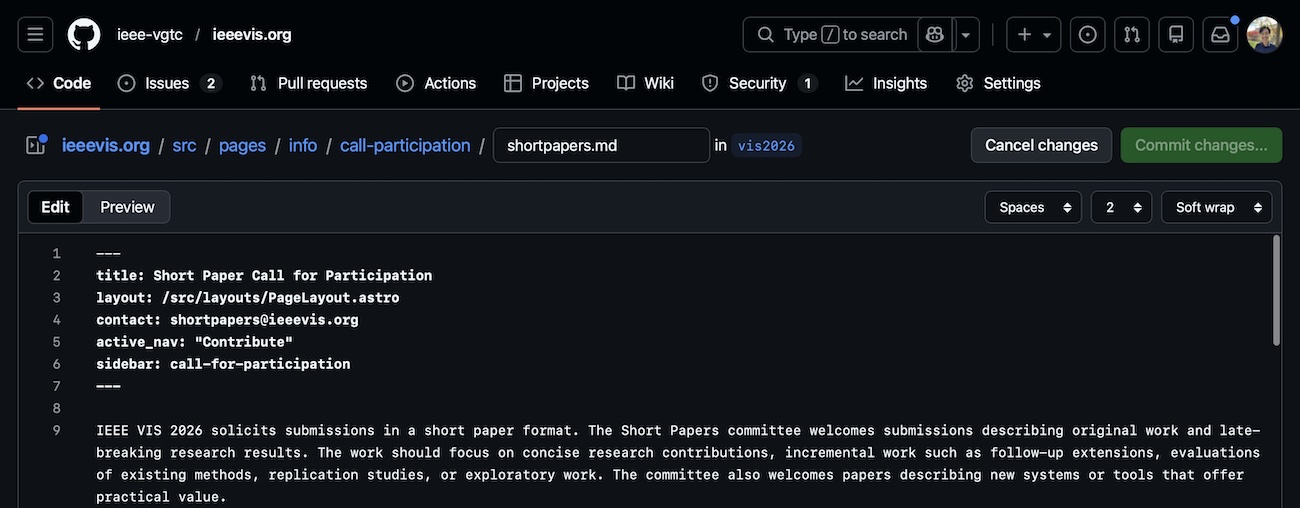
After you’re done making the edits, click Commit Changes and create a new branch:
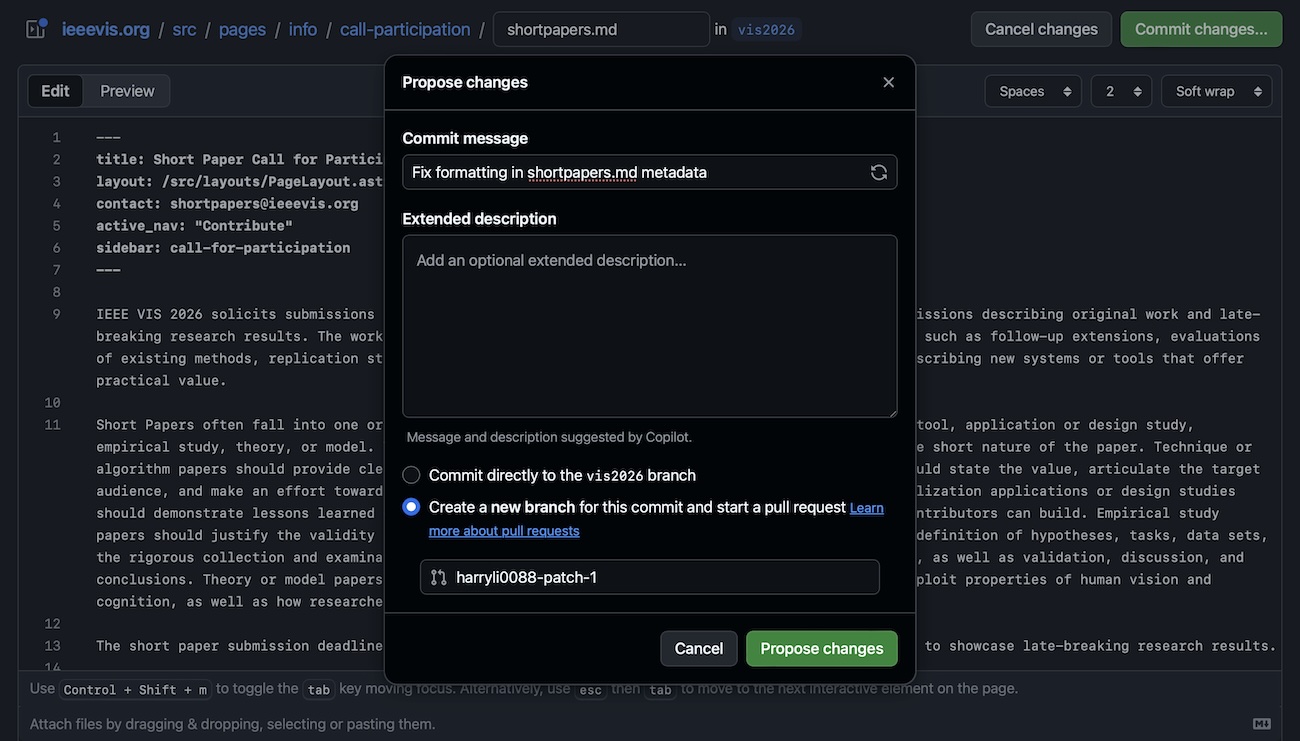
After you click on “Propose file change”, you’ll be taken to something that looks like this, where you can click on “Create Pull Request”:
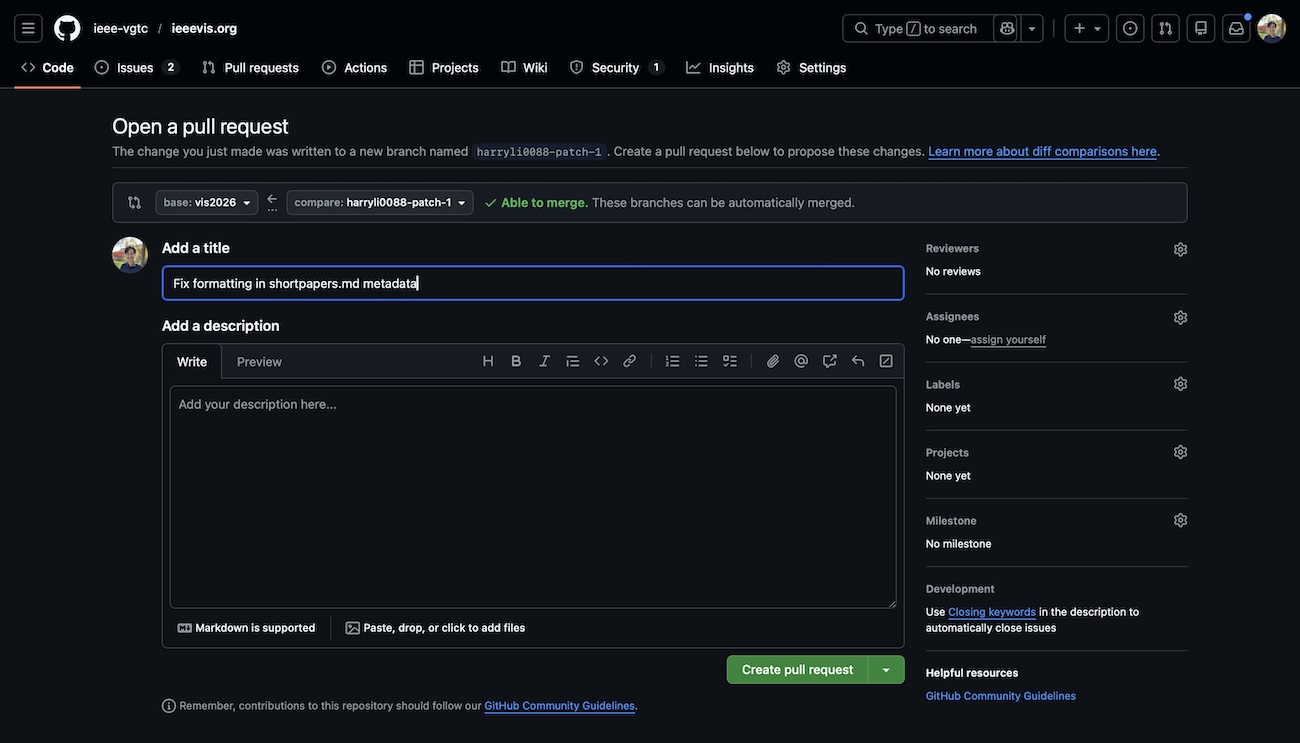
After you click on that, web gets both a bug report and a proposed change:
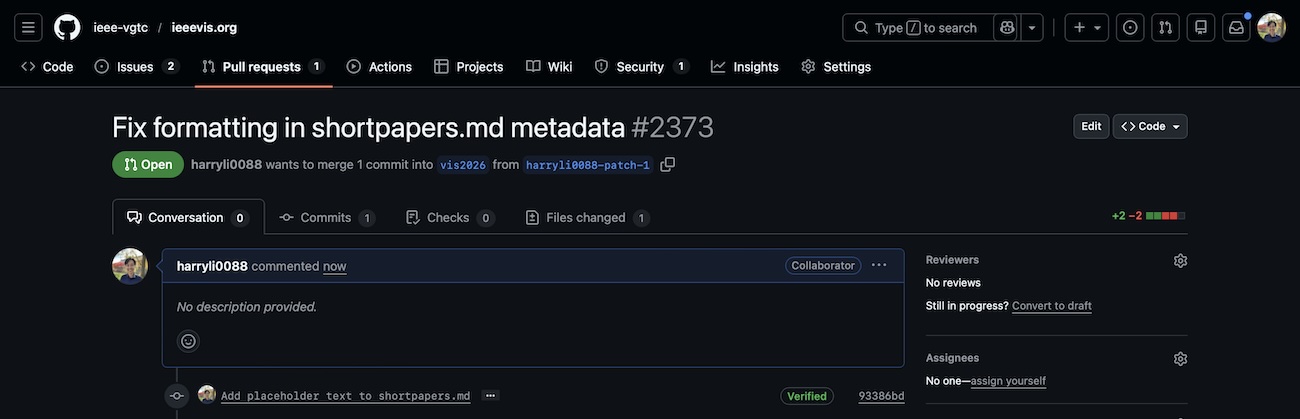
If the change is simple, we’ll simply say “OK”. If the change requires reviewers, we can ask for people to comment on the thread. After everyone says OK, we merge the change and then we will be able to push it to staging.ieeevis.org. All PRs are automatically built to the staging website; you can take a look at the history of deploy actions.
Staging vs Production
We have a staging website that has essentially the same setup as production. The staging site automatically builds when a pull request is merged in. We hold changes in staging for approval by the core committee, and push to production by making a new release.
During non-conference times, web will ask core to approve changes to go to production (http://ieeevis.org) on a weekly cadence, usually Wednesday morning US time. If you have a need for content to “go-live” faster, please e-mail web@ at the conference website domain.
Where are the current files?
Here is an example link for the 2026 paper CFP page. Other URLs are available in similar places: shortpapers, posters, panels.
Note how the URL on GitHub corresponds to the URL on the website.
- GitHub: https://github.com/ieee-vgtc/ieeevis.org/blob/vis2026/src/pages/info/call-participation/call-for-participation.md
- Website: https://ieeevis.org/year/2026/info/call-participation/call-for-participation
(replace https://github.com/ieee-vgtc/ieeevis.org/blob/vis2026/src/pages with https://ieeevis.org/year/2026 and remove the .md extension).
Generally, we copy over all content from the previous year to the current year’s branch. If a corresponding page exists in the previous year, chances are that it exists in the current year, even though it might not be reachable through the navigation bar. For example, you can change “2025” to “2026” to find and edit a file to in the current year’s branch if it exists.
Building the website locally
If you’d like, you can build the website locally and make edits there. Here are the steps to build locally; please be sure to fork the repository, then commit directly to your fork. You can then make a PR from your fork to the official ieeevis.org upstream repo.
- Fork the repository using the button in the GitHub interface (from ieee-vgtc/ieeevis.org).
- Clone your fork: e.g.,
git clone git@github.com:yelper/ieeevis.org.git - Checkout the current year: e.g.,
git checkout vis2026 - Obtain dependencies:
npm install - Run the site locally:
npm run dev. - Make changes to the site
- To edit content on a particular page, go to
src/pagesand find the corresponding markdown file for the page you want to edit. - To edit navigation or sidebars, find the respective
ymlfile insrc/data. You may need to shutdown and restart the site to see yourymlchanges.
If you cloned ieee-vgtc/ieeevis.org directly, you will not have permissions to push commits to the repository, you’ll get an authentication failure message from GitHub. Delete your local repo copy, fork the repository on GitHub, and clone that instead.
Finally, you can request a PR from your fork to the current branch of the upstream ieee-vgtc/ieeevis.org repository (e.g., “ieee-vgtc/ieeevis.org:vis2026” from “yelper/ieeevis.org:master”).
How to compare staging and production files
Unfortunately, there’s not really an automatic link that does this for us. To compare to change for 2026 (for example), take the latest release tag and compare it to the current branch name.
For example, as of this writing, the active branch is vis2026 and the latest release is v2026.1.5. To see what isn’t yet on production, navigate to https://github.com/ieee-vgtc/ieeevis.org/compare/v2026.1.5…vis2026.
Web will attempt to make this link when sending pending approval requests to the core committee to make it easier to see what has changed in the last week.